Showing posts with label Photo Gallary. Show all posts

Photo Gallary application in MVC3 Razor


  • This application is simple Photo Gallary which stores your pictures.
  • The application provides you to organize your pictures by providing album facility.
  • The application allows you to create as many albums and upload as many images in the corressponding album.
  • The user can delete the images and albums.
  • The image can be viewed in higher resolution by clicking on its thumbnail.
  • The application also has simple register and login facility. The user can create their account and upload pictures.

We have divided the entire application into modules.

DataBase Design  : The page explains the ORM used and ER diagram of the database.

Register & Login : This page explains the code used to create the register and login forms. It also explains how the validations are performed and how jQuery is used to make it interactive and dynamic.


User Profile after login : This page is rendered to user after successful login. This page shows the albums created by the user.

The user can create new albums.

Upload Image : This page is rendered when user clicks on album. This page allows the user to upload images for the album clicked. The user can upload and delete images from this page.


Watch Video :


DataBase design used for Photo Gallary


  • We have used SQL Server 2008 as our Database.
  • We are using DBML (Database Markup Language) file and Linq to SQL as ORM (Object Relational Mapping).
  • We have created the database first, then created objects in DBML file from Database.

LoginDetails : This table holds the details of the user. The RegisterId primary key column is referenced in Album and Images tables.

Album : This table holds the album information. The table has UserId as foreign key which tracks album associated to particular user. The album's AlbumId is referenced in Images table.

Images : This table holds the images. The table has UserId and AlbumId as foreign key.

Thus we have seen a simple Database design for our Photo Gallary application.


Register & Login form in Photo Gallary


  • The Register and Login functionality is important in user based applications.
  • We have used jQuery majorly to make the Register and Login form very interesting.


Screenshot :


  • This is the main page. We have used an image which covers most of the page.
  • We have register and Login link on the right top. 
  • On clicking the links the form opens up. We have used jQuery for this.

Controller :

public ActionResult LoginRegister()
        {
            Main registerViewModel = new Main();
            return View(registerViewModel);
        }

This is the Action method which renders the main page. 
We are creating an object of Main class which is our ViewModel to the view.

ViewModel :


using System;
using System.Collections.Generic;
using System.Linq;
using System.Web;
using System.ComponentModel.DataAnnotations;
using PhotoGallary.Models;
using PhotoGallary.CustomValidator;

namespace PhotoGallary.ViewModels
{
    public class Main
    {
        public Register Register { get; set; }
        public Login Login { get; set; }
    }

    public class Register
    {
        [Required(ErrorMessage = "Required")]
        public string FirstName { get; set; }

        [Required(ErrorMessage = "Required")]
        public string LastName { get; set; }

        [Required(ErrorMessage = "Required")]
        public string Username { get; set; }

        [Required(ErrorMessage = "Required")]
        public string Password { get; set; }

    }

    public class Login
    {
        public string LoginUserName { get; set; }

        public string LoginPassword { get; set; }
    }
}


  • The above is our ViewModel. We are actually passing two view models as a part of one class.
  • In the Main class we have created properties of Register and Login class.
  • In the Register class we have used DataAnnotation attributes to validate the user's input.

View :

@model PhotoGallary.ViewModels.Main

@{
    ViewBag.Title = "LoginRegister";
}

<h1 align="center">Photo Gallary</h1>
<input type="hidden" id="IsValid" name="IsValid" value="@ViewBag.isValid"/>
<img style="position:absolute" src='@Url.Content("~/Content/Images/MainPageGallary.PNG")' alt="MainImage"/>
<span id="RegisterSpan" style="position:absolute;right:20px;cursor:pointer;">Register</span>
<span id="LoginSpan" style="position:absolute;right:20px;top:100px;cursor:pointer;">Login</span>
@using(Html.BeginForm("LoginRegister","LoginRegister"))
{
<div id="RegisterDiv" style="position:absolute;right:20px;width:400px;height:300px;background-color:#232323;color:white;font-family:comic sans ms;display:none;">
   <span id="Success" style="color:White;font-family: comic sans ms;margin-left:40px;"></span>
    <table style="width:100%;height: 100%;margin-left:20px;">
        <tr>
            <td style="width: 100px;">
                @Html.LabelFor(model => model.Register.FirstName)
            </td>
            <td style="width:150px;">
                @Html.TextBoxFor(model => model.Register.FirstName)
            </td>
            <td>
                @Html.ValidationMessageFor(model => model.Register.FirstName)
            </td>
        </tr>
        <tr>
            <td>
                @Html.LabelFor(model => model.Register.LastName)
            </td>
            <td>
                @Html.TextBoxFor(model => model.Register.LastName)
            </td>
    <td>
                @Html.ValidationMessageFor(model => model.Register.LastName)
            </td>
        </tr>
        <tr>
            <td>
                @Html.LabelFor(model => model.Register.Username)
            </td>
            <td>
                @Html.TextBoxFor(model => model.Register.Username)
            </td>
    <td>
                @Html.ValidationMessageFor(model => model.Register.Username)
            </td>
        </tr>
        <tr>
            <td>
                @Html.LabelFor(model => model.Register.Password)
            </td>
            <td>
                @Html.PasswordFor(model => model.Register.Password)
            </td>
    <td>
                @Html.ValidationMessageFor(model => model.Register.Password)
            </td>
        </tr>
        <tr>
            <td>
                <button id="RegisterButton" type="submit" style="cursor:pointer;">Register</button>
            </td>
            <td>
                <input type="button" style="cursor:pointer;" id="CancelButton" value="Cancel"/>
            </td>
        </tr>
    </table>
</div>
}

<div id="LoginDiv" style="position:absolute;right:20px;width:300px;height:200px;background-color:#232323;color:white;font-family:comic sans ms;display:none;">
    <span id="ValidationText" style="color:Red;font-family: comic sans ms;margin-left:40px;"></span>
 <table style="width:100%;height: 100%;margin-left:20px;">
        <tr>
            <td>
                @Html.LabelFor(model => model.Login.LoginUserName,"Username")
            </td>
            <td>
                @Html.TextBoxFor(model => model.Login.LoginUserName)
            </td>
        </tr>
        <tr>
            <td>
                @Html.LabelFor(model => model.Login.LoginPassword,"Password")
            </td>
            <td>
                @Html.PasswordFor(model => model.Login.LoginPassword)
            </td>
        </tr>
        <tr>
            <td>
                <button id="LoginButton" style="cursor:pointer;">Login</button>
            </td>
            <td>
                <button id="LoginCancelButton" style="cursor:pointer;">Cancel</button>
            </td>
        </tr>
    </table>
</div>
<script type="text/javascript">
    $("#RegisterSpan").click(function () {
        $("#RegisterDiv").show("slow");
    });

    $("#CancelButton").click(function () {
        $("#Success").html("");
        $("#RegisterDiv").hide("slow");
        $("input[type=text]").val("");
        $("input[type=password]").val("");
        location.href = '@Url.Action("LoginRegister","LoginRegister")';
    });

    $("#LoginSpan").click(function () {
        $("#LoginDiv").show("slow");
    });

    $("#LoginCancelButton").click(function () {
        $('#Login_LoginUserName').val("");
        $('#Login_LoginPassword').val("");
        $("#LoginDiv").hide("slow");
        location.href = '@Url.Action("LoginRegister","LoginRegister")';
    });


    $(document).ready(function () {
        var isValid = $("#IsValid").val();
        if (isValid == "False") {
            $("#RegisterDiv").show();
        } else if (isValid == "True") {
            $("#Success").html("Registration Successfully Done.");
            $("#Register_FirstName").val("");
            $("#Register_LastName").val("");
            $("#Register_Username").val("");
            $("#RegisterDiv").show();
        }
        $('#LoginButton').click(function () {
            var username = $("#Login_LoginUserName").val();
            var password = $("#Login_LoginPassword").val();
            if (username == "" && password == "") {
                $("#ValidationText").html("Enter Username and Password");
                return;
            }
            else if (username == "") {
                $("#ValidationText").html("Enter Username");
                return;
            }
            else if (password == "") {
                $("#ValidationText").html("Enter Password");
                return;
            }
            $.ajax({
                url: '@Url.Action("Login","LoginRegister")',
                type: 'POST',
                data: { userName: username, password: password },
                success: function (data) {
                    if (data.value == "Invalid") {
                        $("#ValidationText").html("Invalid USername and Password");
                    } else {
                        location.href = '@Url.Action("UserProfile","LoginRegister")';
                    }
                },
                error: function () {
                    alert("error");
                }
            });

        });
    });

</script>


  • The above is our view. As mentioned earlier, we have passed two view models to this view. 
  • One for Register form and other for Login. 
  • The Register form posts data to following controller method on submit.

Action Method post for Regiser form :

[HttpPost]
        public ActionResult LoginRegister(Main main)
        {
            if (ModelState.IsValid)
            {
                Gallary gallary = new Gallary();
                ViewBag.isValid = true;
                bool isSaved = gallary.SaveRegisterDetails(main.Register);
                return View(main);
            }
            else
            {
                ViewBag.isValid = false;
                return View(main);
            }
        }


  • The register form data is posted to the above action method. We are passing the object of Main class. 
  • The DataAnnotation validated the properties and if the form is valid then the user details are saved, otherwise the viewmodel object with error messages are returned back to the view.
  • As you can see in the above action method. We have a class named Gallary, which is our service class.
  • The SaveRegisterDetails in Gallary class is as below :
Service Method :

public bool SaveRegisterDetails(Register register)
        {
            using(GallaryDataContext dbContext = new GallaryDataContext())
            {
                LoginDetails details = new LoginDetails();
                details.FirstName = register.FirstName;
                details.LastName = register.FirstName;
                details.Username = register.Username;
                details.Password = register.Password;
                dbContext.LoginDetails.InsertOnSubmit(details);
                dbContext.SubmitChanges();
            }
            return true;
        }

The above method saves the user details into the database. We have created a separate service class to hold methods that queries with database and return results.

Action Method post for Login form :

[HttpPost]
        public ActionResult Login(string userName,string password)
        {
            Gallary gallary = new Gallary();
            bool isValid = gallary.ValidateCredentials(userName,password);
            if (isValid)
            {
                Session["Username"] = userName;
                Session["password"] = password;
                int userId = gallary.GetUserIdByUsernamePassword(userName, password);
                Session["UserId"] = userId;
                return Json(new { userName = userName, password = password });
            }
            else
            {
                return Json(new {value = "Invalid"});
            }
        }

  • We have not used form for posting Login details. On login click we are collecting the username and password and posting data to above action method using AJAX post.
  • If the user credentials are validated positively then user is redirected to first page, otherwise validation message is shown.
  • Below are the service methods used in the Action method.
Service Method :

public bool ValidateCredentials(string username,string password)
        {
            using(GallaryDataContext dbContext = new GallaryDataContext())
            {
                LoginDetails User = new LoginDetails();
                User = dbContext.LoginDetails.Where(detail => detail.Username == username && detail.Password == password).SingleOrDefault();
            }
            if (User == null)
                return false;
            else
            {
                return true;
            }
        }

        public int GetUserIdByUsernamePassword(string username, string password)
        {
            using(GallaryDataContext dbContext = new GallaryDataContext())
            {
                return dbContext.LoginDetails.Where(user => user.Username == username && user.Password == password).Single().RegisterId;
            }
        }
The ValidateCredentials method validated the user with database and returns true or false accordingly.
Thus we have seen the code used to create the Register and login functionality for Photo Gallary.

UserProfile or first page after login in Photo Gallary


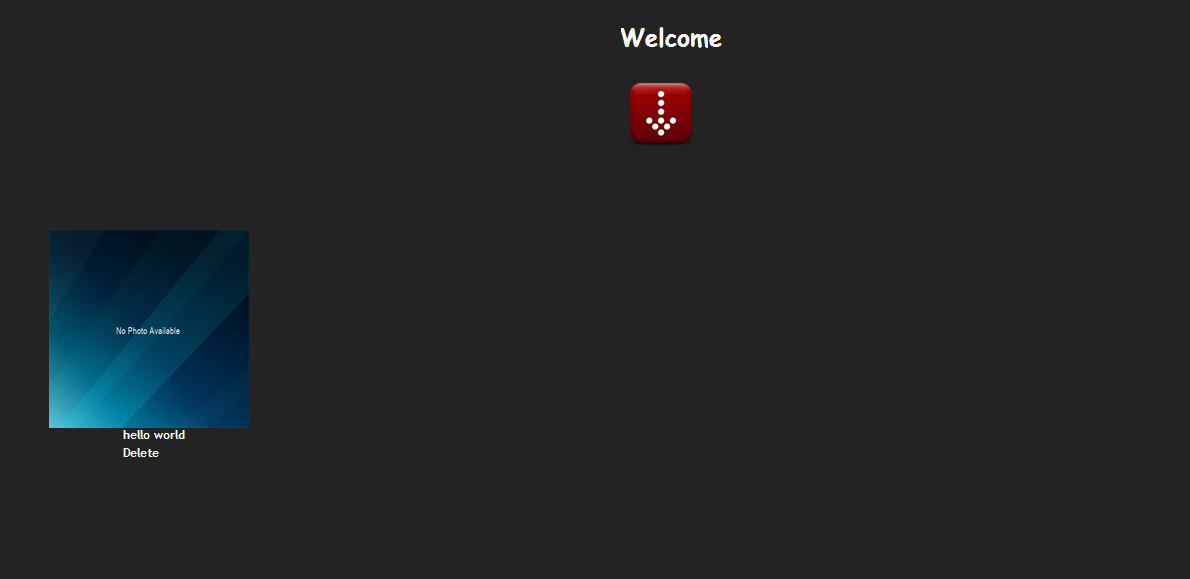
  • The UserProfile is the first page shown to the user after successful login.
  • This page shows the album created by the user.
  • This page also allows user to add new albums. 
  • The user can also delete the albums created earlier.
Screenshot :


  • The above is the UserProfile page for user after login. 
  • The user has one album named hello world. The user can add more albums using red button under Welcome header.


Action method that renders this View :
public ActionResult UserProfile()
        {
            Gallary gallary = new Gallary();
            AlbumViewModel albumViewModel = new AlbumViewModel();
            if (Session["Username"] != null && Session["password"] != null)
            {
                string username = Session["Username"].ToString();
                string password = Session["password"].ToString();
                albumViewModel.Username = username;
                albumViewModel.Password = password;
                albumViewModel.AlbumList = gallary.GetALbumList(username, password);
            }
            return View("UserProfile", albumViewModel);
        }


  • The above action method is called after user is validated against the username and password provided.
  • This action method creates an object of AlbumViewModel. The AlbumViewModel has an property of type list which is filled by albums created by user. 
  • The album list is fetched from database using the username and password provided by the user.

AlbumViewModel :
public class AlbumViewModel
    {
        public string AlbumName { get; set; }
        public string Username { get; set; }
        public string Password { get; set; }
        public List<Album> AlbumList { get; set; }
    }

The top 3 properties are used in form which accepts user input while creating new album. The fourt property gets the albums saved by user in the database.

Service Method GetAlbumList :

public List<Album> GetALbumList(string Username,string Password)
        {
            List<Album> listOfAlbums = null;
            using(GallaryDataContext dbContext = new GallaryDataContext())
            {
                int UserId = dbContext.LoginDetails.Where(user => user.Username == Username && user.Password == Password).Single().RegisterId;
                listOfAlbums = dbContext.Albums.Where(album => album.UserId == UserId).ToList();
                return listOfAlbums;
            }
        }

The above service method fetches the albums created by user from database.


UserProfile View :

@model PhotoGallary.ViewModels.AlbumViewModel
@{
    ViewBag.Title = "UserProfile";
}
<style type="text/css">
 body {
  background-color: #232323;
 }
 .linkClass
    {
    text-decoration:none;
    color:White;
 }
</style>

<h1 id="timepass" align="center" style="color:white;font-family: comic sans ms;font-weight:bolder">Welcome</h1>
<img id="AlbumImage" style="height:100px;width: 100px;margin-left:690px;cursor:pointer;" src='@Url.Content("~/Content/Images/downarrow.png")' alt="Add New Album"/>
<div id="AlbumDiv" style="background-color: #232323;width:300px;height:100px;margin-left:400px;margin-top:-20px;display: none;">
    @using(Html.BeginForm("CreateAlbum","LoginRegister"))
    {
        <input type="hidden" id="Username" name="Username" value="@Model.Username"/>
        <input type="hidden" id="Password" name="Password" value="@Model.Password"/>
        <table style="width:100%;margin-left: 40px;padding-top: 20px;">
            <tr>
                <td style="color:white;font-family: comic sans ms;">
                    @Html.LabelFor(album => album.AlbumName)
                </td>
                <td>
                    @Html.TextBoxFor(album => album.AlbumName)
                </td>
            </tr><tr style="height:10px;"><td></td><td></td></tr>
            <tr style="padding-top: 10px;">
                <td style="text-align: center">
                    <input type="submit" id="AlbumButton" style="cursor:pointer;" value="Create"/>
                </td>
                <td>
                    <input type="button" id="AlbumCancel" style="cursor:pointer;" value="Cancel"/>
                </td>
            </tr>
        </table>
    }
</div><br/><br/><br/>
<div style="width:90%;margin-left:40px;">
   @if (Model.AlbumList.Count != 0)
   {
       foreach (var album in Model.AlbumList)
       {
    <span style="width: 60px; height: 60px;margin-left:20px;cursor:pointer;"><img style="width: 222px;cursor:pointer; height: 220px;margin-top:32px;" src='@Url.Action("GetImageForAlbum","LoginRegister",new {albumId = album.AlbumId})' alt="@String.Concat(@album.AlbumName,'+',@album.AlbumId)" title="@album.AlbumName"  onclick="javascript:GetImagesForAlbum(this);" /></span>
           <span style="color:white;margin-left:-140px;position:absolute; margin-top:250px;">@album.AlbumName</span>
     <span style="color:white;margin-left:-140px;position:absolute; margin-top:270px;cursor:pointer;"><a onclick="javascript:DeleteAlbum(this);"  title="@String.Concat(@album.AlbumName,'+',@album.AlbumId)">Delete</a></span>
       }
   }
   else
        {
            <p align="center" style="color:white;font-size:30px;font-weight:bolder">No Album found</p>
        }
</div>
<script type="text/javascript">
    $("#AlbumImage").click(function () {
        $("#AlbumDiv").show("slow");
    });

    $("#AlbumCancel").click(function () {
        $("#AlbumDiv").hide("slow");
    });

    function GetImagesForAlbum(album) {
        var albumname = album.title;
        var myUrl = '@Url.Action("GetImages","LoginRegister")';
        window.location.href = myUrl + '?album=' + albumname;
    }

    function DeleteAlbum(album) {
        var albumSplit = album.title.split('+');
        var albumName = albumSplit[0];
        var albumId = albumSplit[1];
        var ok = confirm("Do you really want to delete album : " + albumName);
        if (ok) {
            $.ajax({
                url: '@Url.Action("DeleteAlbum","LoginRegister")',
                type: 'POST',
                data: { albumName: albumName,
                    albumId: albumId
                },
                success: function () {
                    location.href = '@Url.Action("UserProfile","LoginRegister")';
                },
                error: function (xhr, status, error) {
                    var verr = xhr.status + "\r\n" + status + "\r\n" + error;
                    alert(verr);
                }
            });
        }

    }
</script>

The view contains form for user to enter details for new album. The submit of this form created a new album in the database.

The form is posted to the below Action method :

[HttpPost]
        public ActionResult CreateAlbum(FormCollection collection, AlbumViewModel album)
        {
            Gallary gallary = new Gallary();
            string username = collection["Username"].ToString();
            string password = collection["Password"].ToString();
            bool result = gallary.CreateAlbum(username, password, album);
            return RedirectToAction("UserProfile");
        }

The above method fetches the username and password from form collection.
The action method also accepts AlbumViewModel object which is passed to the service method to insert into the database.


CreateAlbum method :

public bool CreateAlbum(string Username,string Password,AlbumViewModel createAlbum)
        {
            try
            {
                using(GallaryDataContext dbContext = new GallaryDataContext())
                {
                    int UserId = dbContext.LoginDetails.Where(user => user.Username == Username && user.Password == Password).Single().RegisterId;
                    Album album = new Album();
                    album.AlbumName = createAlbum.AlbumName;
                    album.UserId = UserId;
                    dbContext.Albums.InsertOnSubmit(album);
                    dbContext.SubmitChanges();
                }
                return true;
            }
            catch (Exception)
            {
                return false;
            }
           
        }

The above method inserts a new album into the database.

Delete album :

This view also allows user to delete album. The delete link post the album details to the action method using AJAX post. The album is deleted from database based on the album details posted.

DeleteAlbum Action Method :

[HttpPost]
        public ActionResult DeleteAlbum(string albumName, int albumId)
        {
            Gallary gallary = new Gallary();
            gallary.DeleteAlbum(albumName, albumId, Convert.ToInt32(Session["UserId"])); 
            return RedirectToAction("UserProfile");
        }


  • The above action method is called when user clicks on Delete link. This method accepts albumName and albumId as parameter.
  • This method calls DeleteAlbum Service method which accepts the albumName and albumId parameters.
DeleteAlbum Service Method :
public void DeleteAlbum(string albumName, int albumId , int userId)
        {
            using(GallaryDataContext db = new GallaryDataContext())
            {
                db.delete_Images_Album(albumId,userId);
            }
        }


  • The service method calls an stored procedure using DataContext object. 
  • DBML allows us to add stored procedure which then can be called using context object. 
  • The delete_Images_Album method accepts parameter required for stored procedure.
Stored Procedure :


The stored procedure first deletes all the images for the album and finally the intended album is deleted.

When user clicks the album, the new page is displayed which shows all the images for that album.

Upload Image page in Photo Gllary


  • This page is rendered when user clicks on particluar album.
  • This page shows the images uploaded to the album clicked.
  • This page allows user to upload images to the album. 
  • The user can also delete individual image.
  • The user can view image in high resolution by clicking on the image. 
Screenshot :


This page is rendered when user is redirected to below Action method :

Action Method to render above page :
public ActionResult GetImages(string album)
        {
            if(Session["AlbumFromDelete"] != null && album == null)
            album = Session["AlbumFromDelete"].ToString();
            if (album != null)
            {
                Session["AlbumName"] = album;
            }
            if(TempData["InvalidImage"] != null )
            {
                ViewBag.InvalidFormat = true;
            }
            else
            {
                ViewBag.InvalidFormat = false;
            }
            ImageViewModel model = new ImageViewModel();
            Gallary gallary = new Gallary();
            Session["AlbumId"] = gallary.GetAlbumIdByAlbumNameUserId(Session["AlbumName"].ToString(), Convert.ToInt32(Session["UserId"]));
            model.AlbumName = album;
            if(Session["AlbumName"] != null && album != null)
            {
                Session["AlbumName"] = album;
            }
            model.ImageList = gallary.GetImageListForAlbum(Convert.ToInt32(Session["AlbumId"]), Convert.ToInt32(Session["UserId"]));
            return View(model);
        }

We have used ImageViewModel for this view. This method fetches the images stored in database for this album. These images are then shown on UI.

ImageViewModel :

public class ImageViewModel
    {
        public List ImageList { get; set; }

        public string AlbumName { get; set; }

        public string FileExtension { get; set; }

        [ImageValidator]
        public HttpPostedFileBase File { get; set; }
    }

Service method used in Above Action method :


public int GetAlbumIdByAlbumNameUserId(string albumName,int userId)
        {
            using(GallaryDataContext dbContext = new GallaryDataContext())
            {
                return dbContext.Albums.Where(album => album.AlbumName == albumName && album.UserId == userId).Single().AlbumId;
            }
        }

        public List<Images> GetImageListForAlbum(int albumId,int userId)
        {
            List<Images> imageList = null;
            using(GallaryDataContext gallaryDataContext = new GallaryDataContext())
            {
                imageList = gallaryDataContext.Images.Where(images => images.AlbumId == albumId && images.UserId == userId).ToList();
            return imageList;
            }
        }

Uploading new Image :

We have used file control to select an image. We have rendered a form which contains the file control. On upload click the form is posted to below Action method :


[HttpPost]
        public ActionResult UploadImage(ImageViewModel imageViewModel)
        {
            if (ModelState.IsValid)
            {
                Gallary gallary = new Gallary();
                gallary.SavePlayerImage(imageViewModel, Convert.ToInt32(Session["UserId"]),
                                        Convert.ToInt32(Session["AlbumId"]));
                return RedirectToAction("GetImages", new { album = imageViewModel.AlbumName.ToString() });
            }
            else
            {
                TempData["InvalidImage"] = "Upload images only";
                return RedirectToAction("GetImages", new { album = imageViewModel.AlbumName.ToString() });
            }
        }

Upload Image Action :
[HttpPost]
        public ActionResult UploadImage(ImageViewModel imageViewModel)
        {
            if (ModelState.IsValid)
            {
                Gallary gallary = new Gallary();
                gallary.SavePlayerImage(imageViewModel, Convert.ToInt32(Session["UserId"]),
                                        Convert.ToInt32(Session["AlbumId"]));
                return RedirectToAction("GetImages", new { album = imageViewModel.AlbumName.ToString() });
            }
            else
            {
                TempData["InvalidImage"] = "Upload images only";
                return RedirectToAction("GetImages", new { album = imageViewModel.AlbumName.ToString() });
            }
        }

SavePlayerImage Service Method :
public void SavePlayerImage(ImageViewModel model,int userId,int albumId)
        {
            byte[] imageBytes = ConvertToBytes(model.File);
            Images playerImage = new Images();
            playerImage.AlbumId = albumId;
            playerImage.UserId = userId;
            playerImage.ImageBytes = imageBytes;
            playerImage.Extension = model.File.ContentType;
            using(GallaryDataContext gallaryDataContext = new GallaryDataContext())
            {
                gallaryDataContext.Images.InsertOnSubmit(playerImage);
                gallaryDataContext.SubmitChanges();
            }
        }

The above service methos saves the image bytes in the database. The raw image file is first converted to bytes and then it is saved into the database.

Convert Image to Bytes :

public byte[] ConvertToBytes(HttpPostedFileBase Image)
        {
            byte[] imageBytes = null;
            BinaryReader reader = new BinaryReader(Image.InputStream);
            imageBytes = reader.ReadBytes((int)Image.ContentLength);
            return imageBytes;
        }

Delete Image Action:
public ActionResult DeleteImage(int imageId)
        {
            Gallary gallary = new Gallary();
            gallary.DeleteImage(imageId, Convert.ToInt32(Session["UserId"]));
            Session["AlbumFromDelete"] = Session["AlbumName"].ToString();
            return RedirectToAction("GetImages", new { album = Session["AlbumName"].ToString() });
        }


  • This method is called when user clicks the Delete link under the image.
  • This action method calls a service method which deletes the image using stored procedure.
DeleteImage Service Method :
public void DeleteImage(int imageId, int userId)
        {
            using(GallaryDataContext db = new GallaryDataContext())
            {
                db.Delete_Image(userId, imageId);
            }
        }

The service method accepts imageId and userId and passes it to the Delete_Image method which calls an store procedure and deletes the image.

Stored Procedure :


High Resolution :
public WebImage GetImage(int id)
        {
            Gallary gallary = new Gallary();
            byte[] ImageBytes = gallary.GetImageBytes(id);
            return new WebImage(ImageBytes).Write("jpeg");
        }

When user clicks on an image, the above action method is called and it returns the image in higher resolution.